Muse, Grok Bot and Dots for Sales: What Each New AI Agent Can Do for Your Pipeline


Muse, Grok Bot and Dots are the three always-on AI agents that shipped this quarter, and every one of them can take real work off a seller’s plate.
In seven weeks, three of the biggest AI companies shipped the same idea. xAI opened the Grok Bot beta in August. Meta launched Muse on September 8. OpenAI unveiled Dots at DevDay on September 29. The pitch is simple: stop prompting a chatbot and start handing work to an agent that has its own computer, keeps running when you close the tab, and checks with you before it does anything that matters.
Most of the launch coverage is about booking dinners and planning trips. This is the sales version. What each agent actually is, the setups that make sense for a seller this week, where they stop being useful, and where a sales-native agent picks up the work (if you are still deciding how much of your stack to build yourself, start with the AI SDR build vs buy guide).
TL;DR
- All three are general-purpose agents with a persistent cloud computer, a browser, and approval checkpoints. None of them was built for pipeline.
- Muse (Meta) is the consumer and small-business play. Best for founders and solo sellers who live in Instagram, Facebook, Shopify, and Slack. US only, with a Canada rollout for the small business version.
- Grok Bot (xAI) is the most sales-literate of the three. xAI’s own docs list a Sales Outbound bot for account research, contact prioritization, and review-ready outreach. Skills are taught by demonstration and routines run on a schedule or on Slack events.
- Dots (OpenAI) lives inside ChatGPT, Slack, and Teams, connects to 4,000+ apps, and runs proactive research in the background. Pro and Business Premium only at launch.
- What none of them bring: verified contact data, a sequencer, deliverability, or a record of which prospects already got touched. That is still your sales stack’s job.
- The practical split: use the general agent for your own research and prep, and a sales-native agent for anything that touches a prospect list or an outbound sequence.
Why this wave matters for sellers
Chat assistants made individual reps faster at writing. They did not change how much work got done while the rep was on calls, at lunch, or asleep. A chat window only works while you are typing into it.
Always-on agents change the unit of work. You hand over a job (“every Monday, research the ten accounts on my list that raised money last week”) instead of a prompt, and the agent comes back with the output. That is a management skill, not a prompting skill, and it is the skill that separates the reps who get leverage from these tools from the ones who try them once and go back to their old tabs.
The three launches differ in who they are built for, what they can reach, and how much they let you delegate without watching. Here is each one through a seller’s lens.
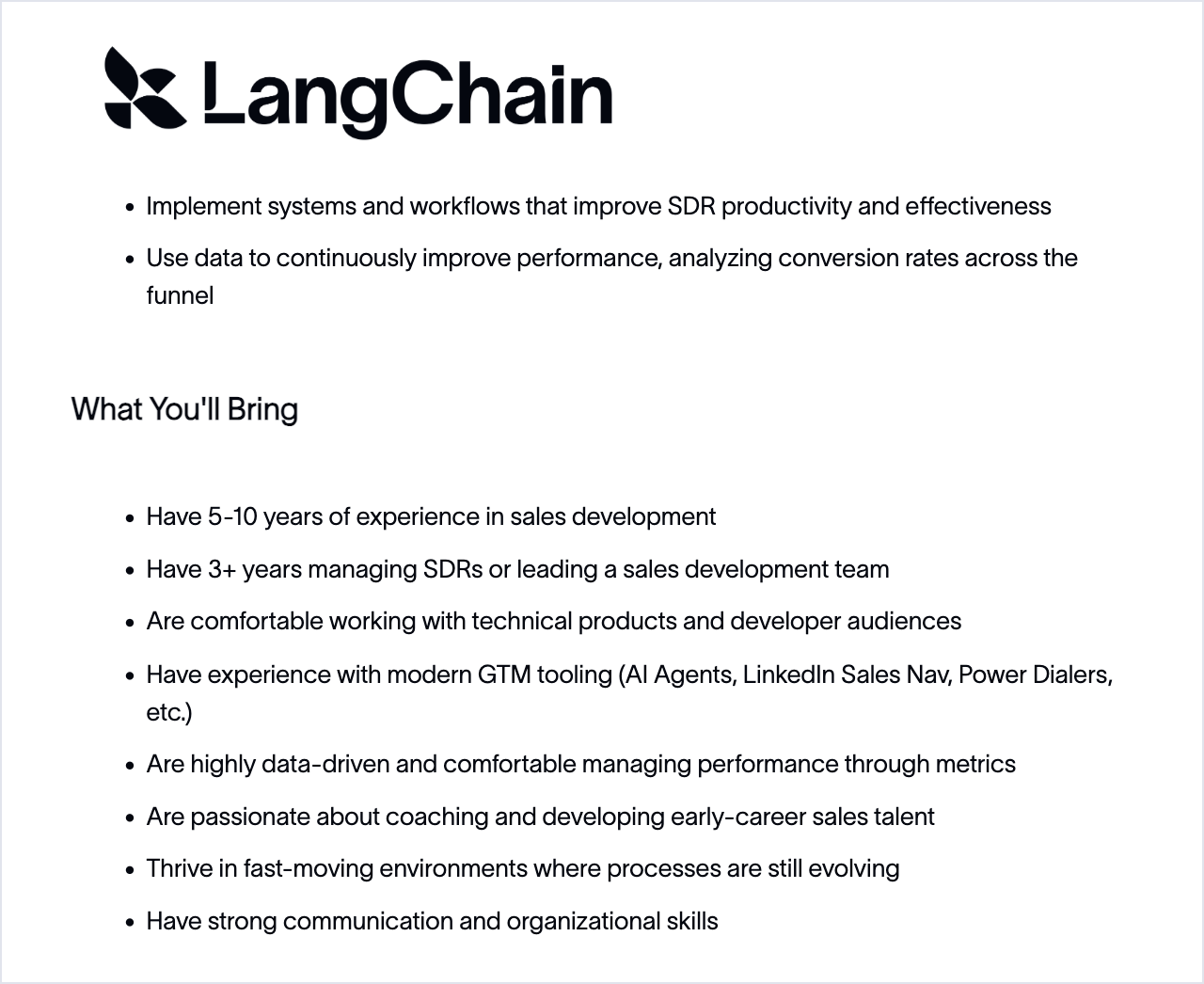
Sales leaders have noticed. Here is a Sales Development Director listing from this month, with AI agents named as expected tooling:
What Muse actually is
Muse is Meta’s personal AI agent, launched September 8, 2026 and powered by Meta’s Muse Spark models. It runs on iOS, Android, and the web, and it is US only for now. It has its own browser and can complete multi-step tasks across the web, and Meta says it asks for approval before it sends an email or makes a purchase. CNBC and TechCrunch report a free tier plus paid plans at $20 and $100 a month.
The sales-relevant piece arrived three weeks later. Muse for Small Business launched September 29 in the US and Canada with connectors to Asana, Box, Canva, Dropbox, Figma, Granola, HighLevel, QuickBooks, Klaviyo, Lovable, Notion, Shopify, Slack, Stripe, Zoom, Facebook, and Instagram. Meta’s line on control is clear: nothing publishes, sends, or spends without your approval.
Two things to know before you point it at customer data. CNBC reports that training on your conversations is on by default with an opt-out, so check that setting before you paste in a deal. And there is no Salesforce or HubSpot connector in the launch list, which tells you who Muse is for: owner-operators and small teams, not a sales org with a CRM of record.
Muse for sales: 3 setups worth copying
Setup 1: The inbound lead brief. If your leads come through Instagram DMs, Facebook, or a Shopify store, Muse can see them. Start each morning by asking it to turn every new lead into a short brief before you reply.
Go through Instagram and Facebook messages from the last 24 hours:
1. Pick out people asking about pricing or a demo.
2. For each one, look up their business website and summarise what they sell,
   roughly how big they are, and what they asked.
3. Put the list in a Notion page called "Leads to answer today", newest first.
Do not reply to anyone.
Setup 2: The meeting follow-up draft. With the Zoom and Granola connectors, Muse can read the call notes and draft the recap. You approve before it goes anywhere.
After each Zoom call with a prospect:
1. Read the Granola notes.
2. Draft a follow-up with the three things they cared about, in their words,
   and the one next step we agreed.
3. Save it as a draft and ask me before sending.
Setup 3: The weekly revenue snapshot. For founder-led sales, connect QuickBooks and Stripe and ask for one page every Friday: new customers, churned customers, open invoices, and which trials are about to end. It is not a forecast, but it is more than most founders look at.
What Grok Bot actually is
Grok Bot is xAI’s always-on agent. The beta opened August 11, 2026 for SuperGrok Heavy, Cursor Ultra, and Teams Premium subscribers and expanded on August 21. Each bot gets a persistent cloud computer, and it works in three ways that matter for a sales team (xAI docs):
- Skills by demonstration. You show the bot a task once, in a recording of up to about ten minutes, and it saves the steps as a reusable skill.
- Routines. A skill can run on a schedule or on an event, such as a new message in a Slack channel or a GitHub event. Each bot holds up to 50 routines.
- Team Bots. A bot can be installed as a Slack app and shared across a team (Team Bots docs).
Here is the part sales leaders should read twice: xAI’s own use case docs include a Sales Outbound bot (account research, contact prioritization, review-ready outreach) and an Account Health bot. Of the three launches, this is the only one whose maker wrote down a sales playbook.
On control, Grok Bot has an Auto Review setting per action: “Ask first” or “Allow automatically”. xAI’s security docs are also blunt about one limit: do not use separate Bots as a security boundary. If two bots share a workspace, treat them as one set of permissions. Usage resets weekly, and early users have complained about hitting the limits mid-week, so a bot that runs research for your whole territory every morning may not last until Friday.
Grok Bot for sales: 3 setups worth copying
Setup 1: The account research routine. Record yourself researching one account the way you actually do it (company site, news, careers page, LinkedIn). Save it as a skill. Then schedule it.
Routine: every weekday at 7am
For each account added to #new-target-accounts in Slack since yesterday:
1. Run the "account research" skill.
2. Post a 5-line brief in the thread: what they sell, recent news,
   hiring signals, likely buyer title, one reason to reach out now.
Set Auto Review to "Ask first" for anything outside Slack.
Setup 2: The Slack-triggered deal brief. When someone drops a meeting into #upcoming-demos, the bot pulls the attendee list, researches each person, and posts a one-screen prep note. The trigger is the Slack message, so nobody has to remember to ask.
Setup 3: The account health watch. Borrow xAI’s Account Health pattern for your customer book. Once a week, the bot checks each top account for leadership changes, layoffs, funding, and support complaints on public channels, and flags the ones that moved.
What Dots actually is
Dots is OpenAI’s always-on agent, announced at DevDay on September 29, 2026. It lives inside ChatGPT and is also reachable in Slack and Microsoft Teams. Each Dot gets its own cloud computer, connects to 4,000+ apps, and keeps working after you close ChatGPT (SiliconANGLE).
What makes Dots different from a scheduled task:
- Proactive updates. A Dot can run read-only research in the background and come back when something changes, instead of waiting for you to ask.
- Preferences that stick. OpenAI says a Dot remembers how you like things done, so the tenth brief looks like you wanted the first one to.
- Watch it live. You can open a Dot and watch it work, and set custom rules on what it can do without asking. Actions go through auto-review.
- Specialist Dots. You can spin up Dots for specific jobs, with one included in the plan.
Availability is the catch. At launch Dots is on ChatGPT Pro and Business Premium, with Enterprise, Edu, and Healthcare in beta. Pro users in the EEA, Switzerland, and the UK are excluded for now. OpenAI also says plainly that Dots can still make mistakes, and Sam Altman’s framing at DevDay was that some parts of life cannot and should not be automated (The Register).
Dots for sales: 3 setups worth copying
Setup 1: The signal watcher. This is where proactive research earns its keep. Give a Dot your top 25 accounts and let it tell you when something happens.
Watch these 25 accounts (list attached).
Tell me in Slack, once a day at most, when any of them:
- announces funding, an acquisition, or a new product
- hires a new VP or C-level leader in sales, marketing, or revenue ops
- posts a job for a role that uses a tool like ours
For each alert, give me the source link and one sentence on why it matters.
Research only. Do not contact anyone.
Setup 2: The call prep Dot in Teams. If your company runs on Microsoft, put a specialist Dot in Teams. Before every external meeting on your calendar, it posts a prep card: who is attending, what their company announced this quarter, and the last thing your team discussed with them.
Setup 3: The pipeline review assistant. Connect your CRM through one of the 4,000+ apps and ask for a Monday note: deals with no activity in 14 days, deals whose close date passed, and the three deals most likely to slip, with the reason for each. Keep the Dot read-only on the CRM until you trust its judgement.
Muse vs Grok Bot vs Dots for sales
| Muse (Meta) | Grok Bot (xAI) | Dots (OpenAI) | |
|---|---|---|---|
| Launched | Sep 8, 2026 (Small Business Sep 29) | Aug 11, 2026 beta | Sep 29, 2026 |
| Who can use it | US; Small Business in US and Canada | SuperGrok Heavy, Cursor Ultra, Teams Premium | ChatGPT Pro, Business Premium; Enterprise in beta |
| Where it lives | Muse app, web, Meta apps | Grok, Slack (Team Bots) | ChatGPT, Slack, Teams |
| Reach | 15+ named connectors plus Facebook and Instagram | Browser and apps on its own computer | 4,000+ apps |
| Runs on its own | Multi-step tasks with approvals | Up to 50 routines per bot, schedule or event | Proactive background research |
| Control | Approval before send, publish, or spend | Ask first or Allow automatically | Custom rules plus auto-review |
| Best sales fit | Founder-led sales, inbound from social | Account research and Slack-driven prep | Signal watching and meeting prep |
What these agents do not solve
Every setup above has one thing in common: the agent does research and drafting around your pipeline. It does not run your outbound. Four gaps show up the moment you try.
Nobody gives them the contacts. A general agent can find a company and guess at a buyer. It cannot give you a verified email or a direct dial. Scraping a guess from a web page and sending to it is how domains get burned.
Nobody tracks who was touched. Three reps running three bots will research the same account on the same morning and pitch the same VP. A sales agent needs to know who is already in a sequence, who replied, who opted out, and who a teammate owns.
Sending is the hard part. Inbox rotation, send windows, bounce handling, and reply detection are what keep your domain alive. None of the three launches is built for that, and none of them claims to be.
Approvals do not scale per message. “Ask first” is right for one email. It is a full-time job at 200 prospects a week. What you want is to approve the agent’s plan and its first run, set limits, and let it work inside them.
The same job, done twice
Give one brief to a general agent and to a sales agent: every weekday, find 25 VPs of Sales at Series A SaaS companies and add them to my founder sequence.
| Step | Grok Bot, Dots or Muse | Salesgear agent |
|---|---|---|
| Find the right people | Browses the web and guesses at titles | Searches 800M+ contacts with your ICP filters |
| Get an email | Guesses a pattern or scrapes a page | Finds and verifies it, skips anything that would bounce |
| Avoid double-touching | No record of who your team already contacted | Skips anyone in a sequence, opted out, or on do-not-contact |
| Start outreach | Drafts emails for you to approve one by one | Enrolls them in your sequence, which handles sending |
| Tomorrow | You ask again, or maintain a routine | Runs at 8am in your timezone and reports every contact and why |
You end up with a research memo from the first column and a fuller pipeline from the second. For the full playbook, with nine agents and their briefs, read AI agents for sales: hand off the busywork, keep the selling.
Where Salesgear agents fit
That is the job Salesgear agents were built for. They are always-on agents like the three above, except their whole world is your pipeline.
- Describe the job in plain English. “Every weekday, find ten VPs of Sales at US SaaS companies that raised a Series A this month and add them to my founder sequence.” Salesgear turns that into a step-by-step agent you can read and edit before it runs.
- Start from a template. Nine ready-made agents cover the common jobs: Daily ICP Prospector, Event agent, List prospector, Companies to people, Lookalike companies, LinkedIn import, Reply router, Target accounts (ABM), and a Daily activity report.
- One-off or recurring. Run it now, put it on a schedule in your timezone, or trigger it on an event such as a reply, a new contact, or a sequence completing.
- Real data underneath. Every agent works on 800M+ verified contacts with 95% direct-dial and mobile coverage, and can run Deep Research on each contact before anything goes out.
- It enrolls, the sequencer sends. Agents do not send emails on their own. They add the right people to the right sequence, which handles inboxes, send windows, bounces, and reply detection.
- Guardrails you set once. A dry test run shows what the agent would do before it touches anything. The first run waits for your approval before any outbound, and you can keep approval on every run if you prefer. Per-run caps and credit ceilings stop a runaway job.
- A reason for every contact. Each run shows who was added, who was skipped, and why, with a summary to email or Slack.
The general agents and Salesgear agents are not either-or. Keep a Dot or a Grok Bot on research and meeting prep, and let the pipeline work run somewhere that knows your contacts, your sequences, and your sending rules. If you already work in Claude or ChatGPT, the Salesgear MCP lets you call the same data and actions from there.
How to pick for your team this quarter
- Solo founder selling to small businesses: Muse for inbound triage and follow-ups, a Salesgear agent for the outbound list.
- SDR team that lives in Slack: Grok Team Bots for account research threads, Salesgear agents for daily prospecting and enrollment.
- AE team on Microsoft 365: Dots in Teams for signal watching and call prep, Salesgear for the sequences those signals feed.
- Whoever you are: start with one job, run it for two weeks, and read every output. You are managing a new teammate, and the first two weeks decide whether you trust it.
Related reading
- Claude Cowork for sales teams: 4 setups worth copying
- MCP for sales teams
- ChatGPT apps vs Claude skills vs custom GPTs
- The best AI SDR tools, compared
Frequently asked questions
Muse is Meta's personal AI agent, launched September 8, 2026 and powered by Meta's Muse Spark models. It has its own browser, completes multi-step tasks, and asks for approval before sending email or making purchases. It is available in the US on iOS, Android, and the web. Muse for Small Business followed on September 29 in the US and Canada, with connectors to apps like Slack, Shopify, Stripe, Zoom, Notion, and HighLevel.
Grok Bot is xAI's always-on agent with a persistent cloud computer. You teach it skills by demonstration, run those skills as routines on a schedule or on events like Slack messages (up to 50 routines per bot), and share bots with a team as a Slack app. xAI's own docs include a Sales Outbound bot for account research, contact prioritization, and review-ready outreach.
Dots is OpenAI's always-on agent, announced at DevDay on September 29, 2026. Each Dot has its own cloud computer, connects to 4,000+ apps, runs proactive read-only research, and is reachable in ChatGPT, Slack, and Microsoft Teams. At launch it is available on ChatGPT Pro and Business Premium, with Enterprise, Edu, and Healthcare in beta.
It depends on where your team works. Grok Bot is the most sales-oriented out of the box, with an official Sales Outbound use case and Slack-triggered routines. Dots is strongest for signal watching and meeting prep, especially on Microsoft Teams. Muse fits founder-led sales where leads come from Instagram, Facebook, and Shopify. None of them provides verified contact data or a sequencer.
They can draft and, with approval, send individual emails. They are not built to run outbound at volume: they do not provide verified contacts, manage inbox rotation or send windows, handle bounces, or track who is already in a sequence. For that, pair them with a sales engagement platform.
Salesgear agents are built for pipeline work only. You describe the job in plain English or start from one of nine templates, and the agent finds people from 800M+ verified contacts, researches them, and enrolls them into your sequences on a schedule or trigger. A dry test run, first-run approval, per-run caps, and a reason for every contact keep you in control.

Premsanth Rajamani leads marketing and growth at Salesgear. An engineer by background, he runs the company's growth engine hands-on, from SEO and content systems to the AI workflows behind them, and writes practical guides on prospecting, outbound strategy, and putting AI to work in real sales and marketing motions.